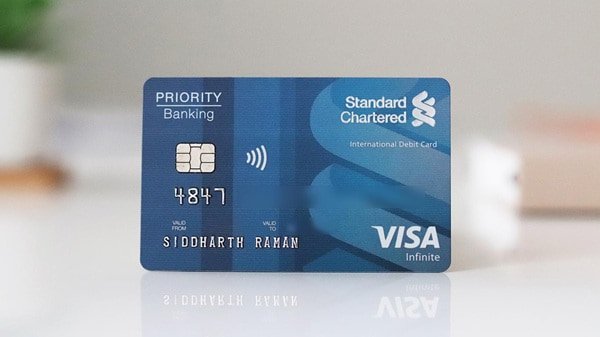
Standard Chartered Bank India gives debit-card holders digital control over most of the card setup process. A customer can create or reset the debit card PIN through SC Mobile or Online Banking, while separate controls are available for ATM, POS, online, contactless and international transactions.
The Standard Chartered India debit card uses a 4-digit Personal Identification Number or PIN. The bank’s current debit-card help page allows customers to generate a fresh PIN through its digital banking channels. A PIN can also be regenerated if the existing one has been forgotten.
Card activation and PIN generation should not be confused with enabling every transaction channel. Even after the card is ready for use, ATM, POS, online, contactless and international transactions can be independently blocked, unblocked or assigned separate limits through Standard Chartered’s Manage Card Usage service.
What Do You Need to Set Up a Standard Chartered Debit Card?
Keep the following ready:
- Standard Chartered Bank India debit card
- Mobile number registered with the bank
- Access to SC Mobile or Online Banking
- Registered mobile phone for OTP verification
- Debit-card details if requested during authentication
A registered mobile number is especially important because Standard Chartered uses OTP verification for online debit-card transactions and several digital banking services.
How to Activate a New Standard Chartered Bank Debit Card?
Standard Chartered India’s current public help page does not provide one separate universal activation sequence for every debit-card variant. The card’s status can depend on whether it is newly issued, renewed or replaced.
For a new card, the practical setup is:
- Log in to Standard Chartered Online Banking or SC Mobile.
- Open Help & Services.
- Go to Card Management.
- Set or generate the debit-card PIN using the available debit-card PIN service.
- Complete the required authentication.
- Once the PIN is ready, make a small ATM or chip-and-PIN POS transaction to check that the card is usable.
- Open Manage Card Usage and check whether the transaction channels you need are enabled.
If the card still appears inactive after successful PIN setup, contact Standard Chartered Phone Banking rather than repeatedly attempting transactions.
This approach is preferable to copying activation procedures from Standard Chartered operations in other countries, because card activation and PIN rules vary between markets.
Standard Chartered Debit Card PIN Generation Through SC Mobile
SC Mobile provides a convenient way to generate a debit-card PIN without visiting a branch.
Follow these steps:
- Log in to the SC Mobile app.
- Go to Help & Services.
- Open Card Management.
- Select Debit/ATM Card PIN Change.
- Select the debit card for which you want to set the PIN.
- Follow the authentication instructions displayed on the screen.
- Enter your preferred 4-digit debit card PIN.
- Confirm the new PIN.
- Complete OTP or other authentication when requested.
- Submit the request.
Standard Chartered India’s current help page specifically gives:
Help & Services → Card Management → Debit/ATM Card PIN Change
as the route for generating a debit-card PIN.
Standard Chartered Debit Card PIN Generation Through Online Banking
The same PIN-generation facility is available through Standard Chartered Online Banking.
Follow these steps:
- Log in to Standard Chartered Online Banking.
- Select Help & Services.
- Go to Card Management.
- Choose Debit/ATM Card PIN Change.
- Select the required debit card.
- Enter the new 4-digit PIN according to the instructions displayed.
- Complete the required authentication.
- Confirm the request.
After successful processing, the new PIN can be used for eligible ATM and PIN-authenticated merchant transactions.
What Happens With a Renewed Standard Chartered Debit Card?
Standard Chartered India makes an important distinction between a renewed card and a replacement card.
According to the bank’s current Debit Card PIN help page:
- For a renewed debit card, the existing PIN remains the same.
- For a replacement debit card, the customer can generate a new PIN using Online Banking or SC Mobile.
Therefore, you normally do not have to create another PIN simply because your old card expired and Standard Chartered issued its routine renewal.
How to Reset a Forgotten Standard Chartered Debit Card PIN
If you cannot remember your old PIN, avoid repeatedly guessing it.
Instead:
- Log in to SC Mobile or Online Banking.
- Open Help & Services.
- Select Card Management.
- Choose Debit/ATM Card PIN Change.
- Select your debit card.
- Follow the authentication instructions.
- Choose a new 4-digit PIN.
- Confirm and submit the request.
The PIN-generation facility can therefore be used to create a fresh PIN without depending on a branch-based PIN mailer.
How to Change an Existing Standard Chartered Debit Card PIN
You can use the same digital PIN facility when you know your PIN but want to replace it.
Use:
Online Banking/SC Mobile → Help & Services → Card Management → Debit/ATM Card PIN Change
Choose a PIN that cannot easily be guessed.
Standard Chartered India’s debit-card terms advise against using easily identifiable numbers such as:
- Birth date
- Vehicle registration number
- Repeated digits
- Other numbers directly associated with you
The bank’s current debit-card terms specify that the customer may choose a 4-digit PIN.
How to Enable Online Transactions on a Standard Chartered Debit Card
A debit card can work at an ATM or physical merchant outlet while still being declined for an online purchase. This can happen if online card usage is blocked or its limit is too low.
Standard Chartered provides a dedicated Manage Card Usage facility.
Follow these steps:
- Log in to SC Mobile or Online Banking.
- Go to Help & Services.
- Select Card Management.
- Choose Manage Card Usage.
- Select your debit card.
- Select Domestic or International Transactions.
- Locate Online Transactions.
- Unblock or enable online usage.
- Set an appropriate transaction limit.
- Confirm the change.
The bank allows online transaction limits to be managed independently from ATM and POS limits.
How Are Standard Chartered Online Debit Card Transactions Verified?
Standard Chartered debit cards support secure online transactions using 3D Secure OTP verification.
During an eligible online purchase, you may need to provide:
- Debit card number
- Expiry date
- CVV
The bank then sends an OTP to the mobile number registered with Standard Chartered.
If an OTP does not arrive within about 30 seconds, Standard Chartered advises customers to:
- Select Resend OTP.
- Check mobile network availability.
- Confirm that the correct mobile number is registered with the bank.
- Retry after some time if there is a network problem.
Never share this OTP with another person.
How to Manage ATM Transaction Limits
Standard Chartered lets you independently manage ATM usage.
- Log in to SC Mobile or Online Banking.
- Select Help & Services.
- Go to Card Management.
- Select Manage Card Usage.
- Choose the debit card.
- Select Domestic or International Transactions.
- Open ATM Transactions.
- Block, unblock or change the ATM limit.
- Confirm the request.
The maximum amount available depends on the debit-card variant and account type.
How to Manage POS Transactions
POS transactions can also be controlled independently.
Go to:
Help & Services → Card Management → Manage Card Usage → Select Card → Domestic/International Transactions → POS Transactions
You can then:
- Block POS transactions
- Unblock POS transactions
- Change the applicable POS transaction limit
This can be useful if you mainly use the debit card at ATMs and do not want physical merchant transactions permanently available.
How to Enable Contactless Transactions
Standard Chartered issues contactless debit cards on supported variants.
To manage contactless usage:
- Log in to SC Mobile or Online Banking.
- Select Help & Services.
- Open Card Management.
- Choose Manage Card Usage.
- Select your card.
- Choose Domestic or International Transactions.
- Open Contactless Transactions.
- Block, unblock or set the required limit.
- Confirm the change.
For contactless payments in India, Standard Chartered currently states that eligible transactions of up to ₹5,000 can be completed without entering the PIN. Transactions above this amount require normal PIN authentication.
How to Enable International Transactions
Standard Chartered offers international debit cards that can be used across the Visa network, subject to card eligibility and regulatory requirements.
To control international usage:
- Log in to SC Mobile or Online Banking.
- Open Help & Services.
- Select Card Management.
- Choose Manage Card Usage.
- Select the debit card.
- Select International Transactions.
- Individually enable the channels you need:
- ATM
- POS
- Online
- Contactless
- Set suitable limits.
- Confirm the changes.
Standard Chartered’s debit-card terms state that international use remains subject to applicable RBI and foreign-exchange regulations.
If you are not travelling abroad or making an international purchase, you can keep international channels blocked and enable them only when needed.
How to Block a Lost Standard Chartered Debit Card
If the card is genuinely lost or stolen, changing its PIN is not enough.
Standard Chartered India’s current Digital Services allow customers to block lost or stolen cards. The bank’s Contact Us page specifically lists card blocking among services available digitally.
You can:
- Log in to SC Mobile or Online Banking and use the card-management service.
- Contact Standard Chartered Phone Banking immediately.
- Report any unauthorised transaction at the same time if necessary.
Standard Chartered advises customers to report lost or stolen cards immediately and never disclose their PIN, CVV or OTP.
Standard Chartered India Customer Care Numbers
For Personal Banking customers, Standard Chartered currently lists:
080-49248444
044-47628444
Customers can also call the local STD code followed by:
66014444
For example, customers in Delhi can use 011-66014444.
Standard Chartered states that regular Personal Banking Phone Banking operates from 8:00 AM to 8:00 PM, while emergency services such as reporting a lost card, unauthorised transaction, charge dispute and stop-payment request continue to be serviced outside those normal hours.
Priority and Premium Banking clients have separate dedicated numbers.
What Should You Do After Setting Up the Standard Chartered Debit Card?
Once the card and PIN are working:
- Complete a small chip-and-PIN transaction.
- Check ATM and POS limits.
- Enable online transactions only if you plan to use the card online.
- Keep international usage controlled according to your needs.
- Review the contactless limit.
- Remember that a renewed card normally keeps the existing PIN.
- Generate a fresh PIN for a replacement card when required.
- Never share the PIN, CVV or OTP.
- Block a lost card immediately.
Standard Chartered’s digital card controls are particularly useful because ATM, POS, online and contactless usage do not have to remain permanently enabled at the same limits.
What If Standard Chartered Debit Card PIN Generation Fails?
Before contacting the bank, check whether:
- Your registered mobile number is current.
- SC Mobile or Online Banking is working.
- You have selected the correct debit card.
- The latest OTP is being entered.
- The debit card has not already been blocked.
- You are using the current Debit/ATM Card PIN Change
- A replacement card has been selected instead of the old card.
If it is a renewed card, remember that Standard Chartered says the existing PIN normally remains unchanged. Trying to unnecessarily generate another PIN may therefore not be required.
If the problem continues, call Standard Chartered Personal Banking at 080-49248444 or 044-47628444, or use the city-specific STD code followed by 66014444.
FAQs
1. Can I generate a Standard Chartered India debit card PIN without visiting an ATM?
Yes. Standard Chartered India allows debit-card PIN generation through both SC Mobile and Online Banking. Log in, go to Help & Services → Card Management → Debit/ATM Card PIN Change, select the card and follow the authentication instructions to generate a new PIN.
2. Do I need a new PIN when Standard Chartered renews my expired debit card?
Normally, no. Standard Chartered India states that for a renewed debit card, the PIN remains the same. If your card has instead been replaced, you can generate a new PIN through SC Mobile or Online Banking.
3. Why does my Standard Chartered debit card work at an ATM but not for an online transaction?
The online transaction channel may be blocked or its limit may be too low. Log in to SC Mobile or Online Banking and go to Help & Services → Card Management → Manage Card Usage. Select the card, choose Domestic or International Transactions and unblock or change the limit for Online Transactions.
4. Can I control ATM, POS, online and contactless transactions separately?
Yes. Standard Chartered India’s Manage Card Usage service provides separate controls for ATM, POS, online and contactless transactions. Each category can be blocked or unblocked and its transaction limit can be modified for domestic or international usage.