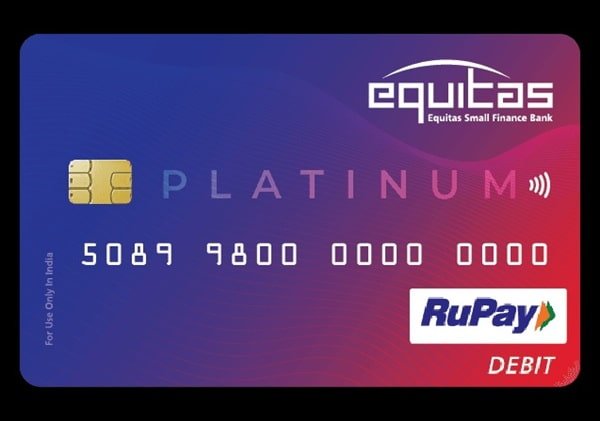
Equitas Small Finance Bank has moved most debit-card servicing to self-service channels, so customers do not normally need to wait for a separate PIN mailer or visit a branch just to start using a new card. The bank provides an instant debit-card activation journey in which customers verify their registered mobile number, select the debit card and create their own four-digit PIN.
Equitas also provides debit-card servicing through Mobile Banking, Internet Banking, ATM, Phone Banking and branch channels. Its current debit-card terms specifically recognise Green PIN or paperless PIN generation after customer authentication through these service channels.
There is an important difference between basic card usage and optional transaction channels. Equitas debit cards are issued for domestic contact-based transactions such as ATM and Point of Sale usage, while online, international and contactless transactions may need to be enabled separately.
What Do You Need to Activate an Equitas Small Finance Bank Debit Card?
Keep the following ready before starting:
- Equitas Small Finance Bank debit card
- Mobile number registered with the bank
- Access to the registered mobile for receiving OTP
- Debit card number
- Date of birth registered with Equitas, where requested
- Bank account linked with the debit card
- Equitas Mobile Banking access if using the app
- Internet Banking credentials if using the online banking channel
The registered mobile number is especially important because Equitas uses OTP authentication for its instant card-activation and several other digital banking processes.
How to Activate an Equitas Small Finance Bank Debit Card
Equitas provides an instant activation facility for new debit cards.
The bank’s current customer booklet gives the following process:
- Scan the debit-card activation QR code provided by Equitas or access the bank’s debit-card servicing journey.
- Enter your registered mobile number.
- Enter the OTP received on your mobile.
- Submit the authentication.
- Open Debit Card Services.
- Select Set PIN.
- Select or provide the required account, date of birth and debit-card information.
- Create a new four-digit debit-card PIN.
- Re-enter the same PIN for confirmation.
- Select Generate PIN.
After successful processing, the debit card PIN is set and the card becomes ready for permitted transactions.
As a practical check, use the card for a small ATM or merchant POS transaction after PIN generation.
Equitas Debit Card PIN Generation Through Mobile Banking
Equitas Small Finance Bank currently provides its updated Equitas 2.0 Mobile Banking app, which includes debit-card management.
The bank’s current app information specifically shows a Set up your Debit Card PIN facility for customers.
To set or reset the PIN through Mobile Banking:
- Open the Equitas Mobile Banking app.
- Log in using your MPIN, biometric authentication or other enabled login method.
- Open the debit-card or card-management section.
- Select the required debit card.
- Choose the available Set PIN, Modify PIN or PIN-management option.
- Complete the authentication requested by Equitas.
- Enter a new four-digit debit-card PIN.
- Re-enter the PIN for confirmation.
- Submit the request.
Once the request is processed successfully, use the new PIN for subsequent debit-card transactions.
The exact menu wording may change as Equitas updates the Equitas 2.0 application, so customers should follow the current card-management options displayed in the app.
Equitas Debit Card PIN Generation Through Internet Banking
Equitas Small Finance Bank’s current debit-card terms state that Green PIN or paperless PIN can also be created through Internet Banking after customer authentication.
A typical process is:
- Log in to Equitas Internet Banking through the bank’s official website.
- Open the debit-card or card-services section.
- Select the required debit card.
- Choose the available PIN set/reset facility.
- Complete the required customer and card authentication.
- Enter a new four-digit debit-card PIN.
- Re-enter it for confirmation.
- Complete OTP or other security authentication displayed by Equitas.
- Submit the request.
Equitas does not currently publish the full Internet Banking PIN menu sequence in the same detail as its instant QR activation journey, so customers should follow the live menu displayed after logging in.
Equitas Debit Card PIN Generation Through ATM
Equitas Small Finance Bank’s current debit-card terms also recognise ATM as one of the channels through which a Green PIN or paperless PIN can be created or subsequently changed.
At an Equitas-supported ATM:
- Insert the debit card.
- Select the PIN-generation or PIN-change service available on the ATM.
- Complete the cardholder verification requested on the screen.
- Enter the new four-digit PIN.
- Re-enter the PIN for confirmation.
- Complete the request.
If an exact ATM menu differs from older instructions, follow the options currently displayed by the ATM.
Customers who have received a PIN with their welcome kit are also advised by Equitas to change that PIN periodically for security.
Can the Debit Card PIN Be Generated Through Phone Banking?
Yes. Equitas Small Finance Bank’s current general terms list Phone Banking as one of the service-delivery channels through which the bank may provide Green PIN or paperless PIN setup.
For assistance, call:
1800 103 1222
from your registered mobile number and use the currently available debit-card servicing options.
Equitas can change its IVR menu sequence, so it is safer to follow the current voice prompts instead of relying on an older keypad combination.
Never disclose your PIN, CVV or OTP to a customer-service representative. Enter confidential credentials only through the bank’s secure authentication system when prompted.
How to Enable Online Transactions on an Equitas Debit Card
A newly issued Equitas debit card is not automatically enabled for every transaction type.
According to the bank’s current debit-card terms, cards are enabled for contact-based usage within India, such as:
- ATM transactions
- Point of Sale transactions
Customers need to separately request activation for transaction types such as:
- Domestic online/e-commerce transactions
- International online transactions
- International card-present transactions
- Contactless transactions
Equitas allows customers to manage these settings through:
- Mobile Banking
- Internet Banking
- Customer Service
- Equitas branch
The bank also provides facilities to switch individual transaction types ON or OFF and modify their limits.
How to Manage Equitas Debit Card Transaction Limits
Equitas provides separate controls for different debit-card transaction types.
Customers can manage:
- ATM withdrawal limits
- POS transaction limits
- Online/e-commerce limits
- Contactless limits
- Domestic transactions
- International transactions
Through Mobile Banking or Internet Banking, open the card-management section, select the debit card and change the required transaction status or limit.
Equitas states that cardholders are provided with facilities to switch ON/OFF and set or modify transaction limits for domestic and international ATM, POS, online and contactless transactions.
This is useful if the debit card works normally at an ATM but an online or international payment is being declined.
How to Enable International Transactions
International transactions are inactive at the time of card issuance unless the customer specifically requests the facility.
Equitas states that PAN is mandatory for activation and usage of an international debit card.
Customers who need international card usage can request activation through:
- Mobile Banking
- Internet Banking
- Customer Service
- Equitas branch
The customer-care number currently listed by Equitas for branch banking is:
1800 103 1222
Customers calling from outside India can use:
+91 44 4004 8500
Enable international transactions only when you actually need the facility and set a sensible transaction limit.
Contactless Transactions on Equitas Debit Cards
For eligible Equitas contactless debit cards:
- No PIN is required for an eligible contactless transaction of up to ₹5,000.
- A PIN is required for transactions above ₹5,000.
- The bank’s current debit-card terms specify a contactless transaction limit of up to ₹10,000 per day.
- The stated contactless transaction count is up to five transactions per day.
The contactless facility is optional and can be disabled through Mobile Banking, Internet Banking or by contacting the bank.
What Should You Do After Setting the Equitas Debit Card PIN?
Once the PIN is successfully generated, carry out a small ATM or POS transaction to check that the debit card is functioning properly.
Also review your card controls before trying online, international or contactless payments.
For better debit-card security:
- Memorise your PIN.
- Do not write the PIN on the debit card.
- Change the PIN periodically.
- Do not share the PIN with another person.
- Never share OTP or CVV details.
- Keep your registered mobile number updated.
- Review transaction SMS alerts promptly.
Equitas specifically states that its bank representatives will never ask customers to disclose sensitive information such as card number, OTP, password or CVV.
What If Equitas Debit Card PIN Generation Fails?
If you are unable to set or reset the debit-card PIN, check whether:
- Your mobile number is registered with Equitas.
- You are receiving OTPs on the registered mobile number.
- The correct debit card is being selected.
- The debit card number is correct.
- Your date of birth matches the bank’s records when requested.
- Your Mobile Banking or Internet Banking access is working.
- The card has not already been blocked or hotlisted.
Also check the particular transaction channel if the PIN works at an ATM but the card fails during online, international or contactless transactions.
If the issue continues, contact Equitas Small Finance Bank at:
1800 103 1222
Customers outside India can contact:
+91 44 4004 8500
FAQs
1. What happens to my old Equitas debit card when I generate the PIN for a reissued card?
Equitas states in its current channel-access request terms that when a debit card is reissued, successful generation of the Green PIN for the new card can automatically hotlist the old debit card, unless specific instructions applicable to the request state otherwise. Once the replacement card is ready, customers should therefore stop relying on the old card.
2. Does an Equitas virtual debit card require an ATM PIN?
No. Equitas states that its eligible virtual debit card does not require an ATM PIN because the virtual card cannot be used for ATM transactions. Virtual debit-card details can be accessed through the bank’s applicable Internet or Mobile Banking facility after authentication.
3. Why does my Equitas debit card work at an ATM but fail during an online payment?
This can happen because ATM and domestic POS usage may already be active while online/e-commerce usage has not been enabled. Equitas requires separate activation of card-not-present transactions. Enable the online transaction facility through Mobile Banking, Internet Banking, Customer Service or a branch and check the applicable online transaction limit.
4. Is PAN compulsory for using an Equitas debit card internationally?
Yes. Equitas Small Finance Bank specifically states that PAN is mandatory for activation and usage of an international debit card for transactions outside India. If international usage has not already been enabled, customers can contact Equitas or use the bank’s available card-management channels to request activation.