Dhanlaxmi Bank has shifted much of its debit-card management to digital channels. Customers can now generate their own debit card PIN, manage ATM and purchase limits, control international usage and temporarily block or unblock the card through online banking instead of depending entirely on branch-based servicing.
The bank’s current Green PIN facility allows a cardholder to create a four-digit ATM/debit card PIN through DhanSmart Mobile Banking, Retail Internet Banking and Dhanlaxmi Bank’s online card service. A valid mobile number registered with the bank is required for PIN setting because OTP authentication is used during the process.
For a newly issued card that has not yet been used, Dhanlaxmi Bank’s official Internet Banking manual states that the debit card can be activated by completing a balance enquiry or another transaction at an ATM. Once the card and PIN are working, additional facilities such as e-commerce, contactless and international usage can be managed separately.
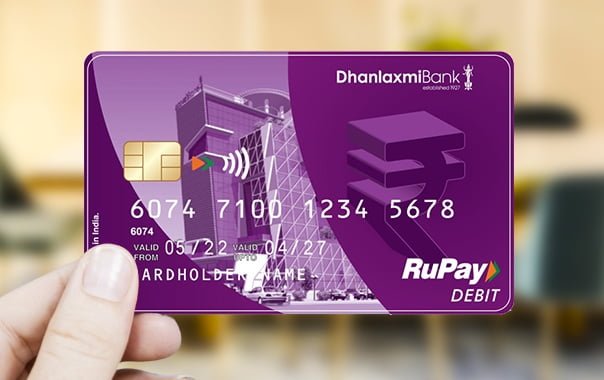
What Do You Need to Activate a Dhanlaxmi Bank Debit Card?
Keep the following ready before starting:
- Dhanlaxmi Bank debit card
- Mobile number registered with the bank
- Access to the registered mobile for OTP verification
- DhanSmart credentials if using Mobile Banking
- Retail Internet Banking credentials if using NetBanking
- Debit-card details when requested
Dhanlaxmi Bank’s current debit-card terms specifically state that a valid and active mobile number registered with the bank is mandatory for setting the PIN through ATM, Mobile Banking or Retail Internet Banking.
How to Activate a New Dhanlaxmi Bank Debit Card
If the debit card has never been used, Dhanlaxmi Bank’s official Internet Banking manual provides a simple activation method.
- Generate or obtain your debit card PIN.
- Visit an ATM.
- Insert the Dhanlaxmi Bank debit card.
- Enter the four-digit PIN.
- Complete a balance enquiry or another ATM transaction.
- Once the transaction succeeds, the card becomes active for permitted usage.
The bank’s official manual specifically states that an unused ATM/debit card can be activated at an ATM by carrying out a balance enquiry or another ATM transaction.
After this, check the card controls if you plan to use the card for online, international or contactless transactions.
Dhanlaxmi Bank Green PIN Generation Through Retail Internet Banking
Retail Internet Banking provides one of the clearest methods for creating or resetting the debit card PIN.
Follow these steps:
- Log in to Dhanlaxmi Bank Retail Internet Banking.
- Open Services.
- Select Debit Cards.
- Choose Green PIN.
- Select the required debit card number.
- Enter your new four-digit PIN.
- Enter the same PIN again for confirmation.
- Select Submit.
- Complete OTP verification using the OTP sent to your registered mobile number.
- Wait for confirmation that the PIN has been successfully set.
Dhanlaxmi Bank’s current Retail and Mobile Banking FAQ gives this Green PIN process: select the card, enter and confirm the new PIN, submit the request and verify it through OTP.
Dhanlaxmi Bank Debit Card PIN Generation Through DhanSmart
DhanSmart is Dhanlaxmi Bank’s current Mobile Banking application. The bank currently lists ATM/Green PIN generation among the services available through the app.
To generate or reset your debit card PIN:
- Open the DhanSmart app.
- Log in using your User ID/password, MPIN or supported biometric login.
- Open Services.
- Select Debit Cards.
- Choose Green PIN.
- Select the debit card.
- Enter a new four-digit PIN.
- Re-enter it for confirmation.
- Submit the request.
- Complete OTP authentication where prompted.
After successful verification, the new PIN becomes the debit card PIN.
DhanSmart currently also provides:
- Card hotlisting
- Debit-card reissuance
- Temporary block/unblock
- Domestic limit management
- International limit management
Dhanlaxmi Bank Green PIN Generation Through the Website
Dhanlaxmi Bank’s current website also provides a dedicated Generate Green PIN for Cards facility.
The process begins by selecting the card type.
- Open Dhanlaxmi Bank’s official Generate Green PIN for Cards
- Select Debit Card.
- Select Proceed.
- Enter the card/customer information requested.
- Complete the required verification.
- Enter your new debit-card PIN.
- Confirm the PIN.
- Complete OTP authentication.
- Submit the request.
The current Dhanlaxmi Bank website directly provides a Green PIN service for both debit and credit cards.
How to Change an Existing Dhanlaxmi Bank Debit Card PIN
If you know your current PIN and simply want to replace it, you can change it through a supported Dhanlaxmi Bank ATM or generate a fresh Green PIN through digital banking.
For normal ATM PIN change:
- Insert the debit card.
- Enter the existing PIN.
- Select PIN Change.
- Enter your new four-digit PIN.
- Re-enter it for confirmation.
- Complete the request.
Choose a PIN that is not easily connected to your personal information. Avoid birth years, repeated numbers or obvious sequences.
What If You Forget Your Dhanlaxmi Bank Debit Card PIN?
You do not need to remember the old PIN to use Green PIN generation.
The easiest options are:
- DhanSmart
- Retail Internet Banking
- Dhanlaxmi Bank’s online Green PIN service
Through online banking, go to:
Services → Debit Cards → Green PIN
Then select the card, enter and confirm a new PIN and verify the request through OTP.
This is safer than repeatedly guessing the old PIN.
What Happens After Repeated Wrong PIN Attempts?
Dhanlaxmi Bank’s current Internet/Mobile Banking FAQ states that an ATM PIN locked because of three wrong attempts is automatically unlocked after 24 hours.
If the PIN is forgotten, it is better to generate a new Green PIN instead of waiting and attempting random combinations again.
If the physical card itself has been blocked or hotlisted, use the applicable card-control or customer-care facility.
How to Enable Online Transactions on a Dhanlaxmi Bank Debit Card
Dhanlaxmi Bank provides separate debit-card controls for ATM, POS, e-commerce and other transaction channels.
Through Retail Internet Banking or DhanSmart:
- Log in to online banking.
- Open Services.
- Select Debit Cards.
- Open Domestic Limit or the relevant card-control option.
- Find the Domestic E-commerce
- Enable the facility.
- Enter the required transaction limit.
- Select the authentication method.
- Verify the request through OTP.
- Confirm the changes.
Dhanlaxmi Bank’s current online banking documentation shows separate controls for Domestic Ecom and other card channels, along with the ability to enable or disable them and set limits.
How to Manage POS Transactions
Dhanlaxmi Bank allows customers to manage POS transactions separately.
Through online banking:
- Go to Services.
- Select Debit Card.
- Open Domestic Limit.
- Enable POS.
- Enter the required limit.
- Complete OTP authentication.
- Submit the request.
The bank’s current FAQ specifically confirms:
Services → Debit Card → Domestic Limit → Enable POS and enter limit.
How to Enable Contactless Transactions
If your Dhanlaxmi Bank debit card supports contactless payments, the contactless facility can be controlled separately.
Through Retail Internet Banking or DhanSmart:
- Open the debit-card services section.
- Select the required card.
- Open domestic transaction limits.
- Locate Domestic Contactless.
- Enable the facility.
- Enter an appropriate limit.
- Complete OTP authentication.
- Confirm the change.
Dhanlaxmi Bank’s current card-management interface includes a separate Domestic Contactless switch and limit setting.
Contactless usage is available only on cards that support the feature.
How to Enable International Transactions
Dhanlaxmi Bank provides separate International Limit Management for debit cards through DhanSmart and online banking.
To manage international usage:
- Log in to DhanSmart or Retail Internet Banking.
- Select Services.
- Choose Debit Cards.
- Open International Limit Management.
- Select the debit card.
- Enable only the international transaction channels you require.
- Set appropriate transaction limits.
- Authenticate the request.
- Confirm the changes.
Dhanlaxmi Bank’s current Mobile Banking page lists Domestic Limit Management and International Limit Management as separate debit-card services.
International availability also depends on the debit-card variant. The bank currently offers Visa International and RuPay international debit-card variants for eligible customers.
How to Temporarily Block or Unblock a Dhanlaxmi Bank Debit Card
If the card is temporarily misplaced, Dhanlaxmi Bank allows it to be blocked without immediately hotlisting it permanently.
Through online banking:
- Open Services.
- Select Debit Cards.
- Choose Block/Unblock Card.
- Select your card.
- Choose temporary block or unblock.
- Review the current card status.
- Select the required transaction settings.
- Authenticate through OTP.
- Confirm the request.
The same card section also allows domestic e-commerce and contactless settings to be managed while the card is being unblocked.
How to Permanently Block a Lost Dhanlaxmi Bank Debit Card
If the debit card is lost or stolen, do not simply change the PIN.
Dhanlaxmi Bank provides Card Hot Listing through:
- DhanSmart
- Retail Internet Banking
- Customer Care
The bank’s current website also provides a dedicated Card Block – Debit/Credit service.
Report a genuinely lost card immediately so that further usage can be stopped.
What Should You Do After Generating the Dhanlaxmi Bank Debit Card PIN?
After PIN generation:
- Complete an ATM balance enquiry or another ATM transaction if the card has never been used.
- Check whether e-commerce transactions are enabled.
- Review ATM and POS transaction limits.
- Enable international usage only when required.
- Keep contactless usage according to your needs.
- Never share your four-digit PIN with anyone.
- Never disclose an OTP or CVV.
- Hotlist the card immediately if it is lost or stolen.
Dhanlaxmi Bank’s current debit-card terms state that the PIN must remain confidential and that the cardholder is responsible for keeping it inaccessible to third parties.
What If Dhanlaxmi Bank Debit Card PIN Generation Fails?
Check the following:
- Your mobile number is registered with Dhanlaxmi Bank.
- The debit card is active.
- The correct card has been selected.
- You are entering a four-digit PIN.
- The latest OTP is being used.
- The card has not been permanently hotlisted.
- DhanSmart or Retail Internet Banking access is working correctly.
If an unused debit card is still inactive, first try activating it through an ATM balance enquiry or another ATM transaction as specified in the bank’s official manual.
For further assistance, Dhanlaxmi Bank currently lists:
Customer Care: 044 4241 3000
Toll-Free: 1800 425 1747
Email: customercare@dhanbank.co.in
FAQs
1. Can I generate a Dhanlaxmi Bank debit card PIN without visiting an ATM?
Yes. Dhanlaxmi Bank provides Green PIN generation through DhanSmart, Retail Internet Banking and its online Generate Green PIN service. Through online banking, select the debit card, enter and confirm the new four-digit PIN and complete OTP verification.
2. How do I activate a Dhanlaxmi Bank debit card that has never been used?
Dhanlaxmi Bank’s official Internet Banking manual states that an unused debit card can be activated through an ATM by completing a balance enquiry or another ATM transaction. Set the PIN first, then complete the ATM transaction.
3. What happens if I enter the wrong Dhanlaxmi Bank ATM PIN three times?
According to the bank’s current Internet/Mobile Banking FAQ, an ATM PIN locked after three incorrect attempts is automatically unlocked after 24 hours. If you have forgotten the PIN, use Green PIN generation instead of repeatedly guessing it.
4. Why does my Dhanlaxmi Bank debit card work at an ATM but not for online payments?
The e-commerce channel or its transaction limit may not be enabled. Dhanlaxmi Bank allows domestic e-commerce, POS, ATM and contactless channels to be controlled separately through its card-management facilities. Enable Domestic Ecom and set an appropriate limit through DhanSmart or Retail Internet Banking before retrying the payment.