Deutsche Bank India has made debit-card PIN setup largely digital. Customers can create their own four-digit ATM/debit card PIN through the MyBank India app or db OnlineBanking, including a pre-login facility for customers who have not yet received or created their online banking login details.
The bank follows a slightly different activation approach from some Indian banks. Newly issued debit cards are active only for domestic ATM and domestic physical Point of Sale transactions. Online/e-commerce, contactless and international transactions are not automatically available and need to be enabled separately.
Therefore, for most new cardholders, the important first steps are to set the debit-card PIN, check the card’s transaction controls and then use the card according to the channels that have been enabled.
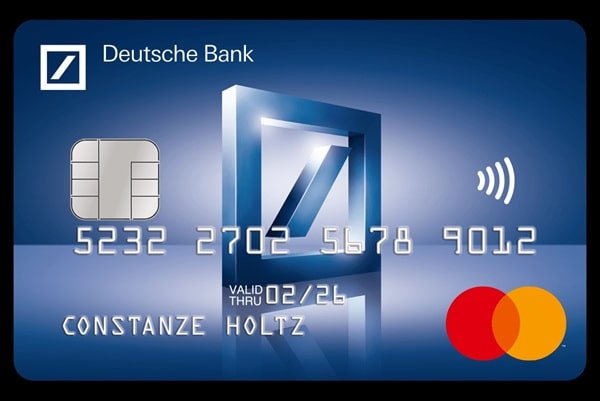
What Do You Need to Set Up a Deutsche Bank Debit Card?
Keep the following ready:
- Deutsche Bank debit card
- Customer ID
- Mobile number registered with Deutsche Bank
- Access to the registered mobile for receiving OTP
- Debit-card details
- Date of birth registered with the bank
- PAN details or mother’s maiden name when using the pre-login PIN facility
- MyBank India or db OnlineBanking credentials if using the logged-in method
- Transaction password when requested
Keeping the registered mobile number updated is important because Deutsche Bank uses OTP authentication for debit-card PIN setup and online card transactions.
How to Activate a New Deutsche Bank India Debit Card
Deutsche Bank’s current debit-card information states that all new debit cards are active for:
- Domestic ATM transactions
- Domestic physical POS transactions
There is therefore no separate general activation procedure published for these basic domestic channels.
A practical first-use process is:
- Set your four-digit debit-card PIN through MyBank India or db OnlineBanking.
- Wait for the successful PIN-generation confirmation.
- Use the card at an ATM or physical POS terminal.
- Enter the newly created PIN.
- Complete a small transaction to confirm that the card and PIN are working correctly.
- Enable e-commerce, contactless or international transactions separately if you require them.
Customers should not assume that PIN generation automatically enables all transaction channels.
Deutsche Bank Debit Card PIN Generation Through MyBank India
MyBank India provides instant debit-card PIN generation.
Follow these steps:
- Log in to the MyBank India
- Open Menu.
- Go to Service Request.
- Open the Debit Card
- Select Set Debit Card PIN.
- Select the debit card for which you want to create the PIN.
- Enter the new four-digit PIN of your choice.
- Complete OTP authentication using the OTP sent to your registered mobile number.
- Complete any additional authentication displayed by the bank.
- Submit the request.
After successful PIN setup, Deutsche Bank sends an SMS and e-mail confirmation.
The same facility can also be used when an existing debit-card customer needs a new PIN.
Deutsche Bank Debit Card PIN Generation Through db OnlineBanking
Customers registered for Deutsche Bank Internet Banking can generate the PIN through db OnlineBanking.
The official route is:
General Services → Debit Card → Set Debit Card PIN
Follow these steps:
- Log in to db OnlineBanking using your Customer ID and password.
- Select General Services from the menu.
- Open the Debit Card
- Select Set Debit Card PIN.
- Choose the required debit card.
- Enter your preferred four-digit PIN.
- Enter your transaction password when requested.
- Enter the OTP sent to your registered mobile number.
- Confirm and submit the request.
A successful request message will be displayed and the bank will send confirmation through SMS and e-mail.
How to Set Deutsche Bank Debit Card PIN Without Online Banking Login Details
One useful feature of Deutsche Bank’s system is that you do not necessarily need existing MyBank India or db OnlineBanking login credentials to set your debit-card PIN.
The bank provides a pre-login PIN-generation option.
Follow these steps:
- Open the MyBank India app or Deutsche Bank Customer Login page.
- Select Set Debit Card PIN.
- Enter your Customer ID.
- Enter the verification code displayed on the screen.
- Continue to the debit-card verification screen.
- Enter the requested debit-card details.
- Enter your date of birth.
- Enter your PAN information or mother’s maiden name, depending on the verification requested.
- Enter the four-digit PIN you want to create.
- Enter the OTP sent to your registered mobile number.
- Submit the request.
After successful verification, the debit-card PIN is created and a confirmation is displayed.
This is particularly useful for a customer who has received the debit card but has not yet obtained or activated Internet Banking credentials.
Can Deutsche Bank Debit Card PIN Be Generated Through ATM or IVR?
Deutsche Bank’s current Code of Bank’s Commitment states that customers may generate a PIN online, through IVRS or at ATMs.
However, the bank’s current public Debit Card Management page provides detailed current step-by-step instructions mainly for:
- MyBank India
- db OnlineBanking
- Pre-login online PIN generation
The current website does not publish the same detailed button-by-button process for ATM or IVR debit-card PIN generation.
Therefore, customers wanting to use ATM or IVR should follow the current instructions displayed by the ATM or IVR rather than relying on older menu sequences.
Can You Request a Physical Deutsche Bank ATM PIN?
Yes. Deutsche Bank’s current Multi-purpose Account Maintenance Form still includes an ATM PIN Request facility.
The form states that a new card and PIN can be delivered to the customer’s registered mailing address where applicable.
However, digital PIN generation through MyBank India or db OnlineBanking is normally faster because the customer can choose the PIN immediately without waiting for a PIN mailer.
How to Enable Online Transactions on a Deutsche Bank Debit Card
A newly issued Deutsche Bank debit card is not automatically enabled for e-commerce transactions.
Customers can enable online/e-commerce usage through MyBank India or db OnlineBanking.
Through MyBank India
- Log in to MyBank India.
- Open Menu.
- Select Service Request.
- Open the debit-card temporary ON/OFF and limit-management facility.
- Select the required debit card.
- Enable E-commerce
- Set an appropriate e-commerce transaction limit.
- Continue to the confirmation screen.
- Verify the changes.
- Complete transaction-password and OTP authentication.
- Submit the request.
How to Manage Debit Card Controls Through db OnlineBanking
The official route is:
General Services → Debit Card → Debit Card Block/Unblock & Modify Limits
From here, customers can manage:
- ATM withdrawals
- POS transactions
- E-commerce transactions
- Domestic transactions
- International transactions
- Contactless transactions
- Temporary card ON/OFF controls
To modify the settings:
- Log in to db OnlineBanking.
- Select General Services.
- Open the Debit Card
- Select Debit Card Block/Unblock & Modify Limits.
- Choose the debit card.
- Enable or disable the required transaction channels.
- Set the required transaction limits.
- Review the changes.
- Enter your transaction password.
- Enter the OTP.
- Submit the request.
How to Enable International Transactions
International debit-card transactions also need to be activated separately.
They can be enabled through:
- MyBank India
- db OnlineBanking
- Relationship Manager
- Phone Banking
- Deutsche Bank branch
International usage is subject to eligibility.
Deutsche Bank specifically states that international usage is not permitted on debit cards linked to:
- Entity accounts
- NRO accounts
- Resident individual accounts without PAN
Customers should enable international transactions only when required and set a reasonable transaction limit.
Contactless Transactions on Deutsche Bank Debit Cards
Contactless transactions are another facility that can be independently enabled or disabled.
Through MyBank India or db OnlineBanking, customers can switch the contactless facility ON or OFF and manage the applicable limit.
Therefore, if an eligible contactless debit card works after being inserted into a POS terminal but fails when tapped, check whether contactless usage has been enabled.
What Should You Do After Setting the Deutsche Bank Debit Card PIN?
After successfully generating the PIN, make a small ATM or physical POS transaction to make sure the card and PIN are functioning properly.
Also review your card controls if you plan to use:
- Online purchases
- Contactless transactions
- International transactions
For better security:
- Never disclose your ATM PIN.
- Do not write the PIN on the card.
- Avoid predictable PINs such as 1234 or your date of birth.
- Never share OTP or CVV information.
- Keep your MyBank India and db OnlineBanking credentials confidential.
- Review transaction alerts sent by the bank.
Deutsche Bank advises customers to change their PIN periodically and avoid PIN combinations based on birthdays, sequential numbers, telephone numbers or other easily identifiable personal information.
What If Deutsche Bank Debit Card PIN Generation Fails?
If you cannot set or reset the PIN, check whether:
- The debit card details have been entered correctly.
- Your Customer ID is correct.
- The mobile number registered with Deutsche Bank is active.
- You are receiving the OTP.
- Your date of birth and PAN details match the bank’s records.
- Your transaction password is correct when using the logged-in facility.
- The debit card has not been permanently blocked.
If the PIN works but a particular transaction fails, check the corresponding ATM, POS, e-commerce, contactless, domestic or international card setting and limit.
For assistance, Deutsche Bank’s current 24×7 Phone Banking numbers are:
- 1860 266 6601
- 1800 123 6601 – Toll-free
Customers outside India can use: +91 22 6601 6601
FAQs
1. What happens if I enter the wrong Deutsche Bank PIN three times?
Deutsche Bank’s current General Business Conditions state that electronic banking access can be disabled when an incorrect password or PIN is entered successively three times. The bank may automatically reactivate access after a specified interval. If access remains blocked, contact Deutsche Bank rather than continuing to enter different PINs.
2. What happens to my old debit card when Deutsche Bank reissues a new one?
Deutsche Bank states that a reissued debit card is delivered with an updated expiry date and CVV. The existing debit card is blocked once the new debit card is activated. Therefore, after receiving and setting up the replacement card, securely destroy the previous card.
3. Can I permanently reactivate a Deutsche Bank debit card after blocking it?
No. Deutsche Bank distinguishes between temporarily switching a card off and permanently blocking it. A card that has been permanently blocked cannot be activated again. If you only want to stop transactions temporarily, use the temporary ON/OFF facility rather than permanent blocking.
4. What should I do immediately if my Deutsche Bank debit card or PIN is compromised?
Block or report the card without delay. Deutsche Bank allows customers to send FRAUD to 561615 from the registered mobile number, call 1860 266 6601, call the dedicated toll-free number 1800 123 6601, or report the issue through the bank’s official fraud-reporting facility. Prompt reporting helps prevent additional unauthorized transactions.