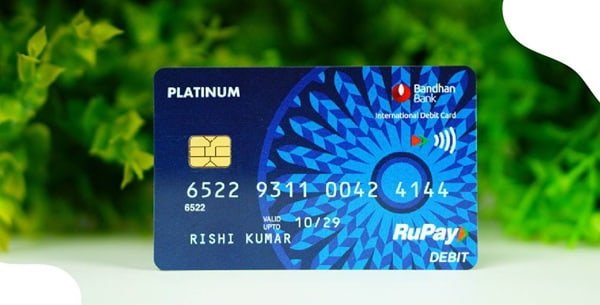
A Bandhan Bank debit card comes with several transaction facilities, but not all of them are available automatically from the beginning. Before starting regular card usage, the cardholder should complete card activation, generate the debit card PIN and check whether the required transaction channels are enabled.
Bandhan Bank provides a Green PIN facility, allowing customers to generate or regenerate their debit card PIN without depending on a physical PIN mailer. Green PIN regeneration is officially available through Bandhan Bank ATM, Phone Banking IVR and Internet Banking.
For security, newly issued and reissued Bandhan Bank debit cards are enabled initially only for domestic ATM and Point-of-Sale transactions. E-commerce, international and contactless transactions have to be switched on separately after the card is received and activated.
What Do You Need to Activate a Bandhan Bank Debit Card?
Keep the following ready before starting:
- Bandhan Bank debit card
- Account linked with the card
- Mobile number registered with Bandhan Bank
- Access to the registered mobile number for OTP
- Internet Banking credentials if using the online method
- Customer/account or card information requested during IVR verification
The registered mobile number is particularly important when Green PIN is generated at an ATM because Bandhan Bank sends the required OTP to that number.
How to Activate a New Bandhan Bank Debit Card
Bandhan Bank’s current debit-card terms recognise activation through ATM, POS and the bank’s Customer Care Centre. Therefore, customers do not necessarily need to visit a branch just for basic card activation.
A practical process is:
- Generate the debit card Green PIN through a Bandhan Bank ATM, Internet Banking or Phone Banking IVR.
- Use the card for an eligible domestic ATM or contact-based POS transaction.
- Enter your newly created PIN.
- Complete the transaction.
- Check whether additional transaction channels such as online or contactless payments need to be enabled.
If the card cannot be activated or the first transaction continues to fail, contact Bandhan Bank Customer Care or visit the nearest branch.
Bandhan Bank Debit Card Green PIN Generation Through ATM
Green PIN regeneration is officially supported at Bandhan Bank ATMs. An OTP is sent to the customer’s registered mobile number as part of the process.
The general process is:
- Visit a Bandhan Bank ATM.
- Insert your Bandhan Bank debit card.
- Select the Green PIN/PIN Generation option displayed on the ATM.
- Choose the option to generate the Green PIN or OTP.
- Enter the information requested by the ATM.
- An OTP will be sent to your registered mobile number.
- Continue with the PIN-generation/validation process.
- Enter the OTP received on your mobile.
- Enter the new debit card PIN you want to use.
- Re-enter the PIN for confirmation.
- Complete the request.
Once the ATM confirms successful PIN generation, the new PIN can be used for eligible transactions.
ATM menu wording can change as Bandhan Bank updates its machines, so follow the Green PIN instructions shown on the screen rather than looking for one exact menu label.
Bandhan Bank Debit Card PIN Generation Through Internet Banking
Bandhan Bank Internet Banking officially supports ATM PIN regeneration.
To generate or reset the PIN online:
- Log in to Bandhan Bank Retail Internet Banking.
- Open the debit-card or ATM-card services section.
- Select the debit card linked with your account.
- Choose the available ATM PIN Regeneration/Green PIN
- Enter the card or account information requested.
- Complete the required authentication.
- Verify the OTP sent to your registered mobile number where requested.
- Set the new debit card PIN according to the instructions displayed.
- Confirm and submit the request.
The exact arrangement of menus may change because Bandhan Bank is currently updating its Internet Banking platform, so customers should follow the debit-card/PIN options visible after login.
Bandhan Bank Debit Card Green PIN Through Phone Banking IVR
Customers can also regenerate a debit card Green PIN through Bandhan Bank’s Phone Banking IVR. The bank’s current schedule of charges specifically confirms Green PIN regeneration through Phone Banking IVR.
Call:
1800 258 8181
Preferably call from the mobile number registered with Bandhan Bank.
Then:
- Select your preferred language.
- Choose the debit-card service option.
- Select PIN generation or Green PIN.
- Enter the customer, account or card information requested by the IVR.
- Complete the authentication process.
- Follow the IVR instructions to generate or set the debit card PIN.
- Wait for confirmation before ending the call.
Bandhan Bank currently lists 1800 258 8181 as its 24-hour toll-free Customer Care number.
Can You Generate the PIN Through mBandhan?
mBandhan is Bandhan Bank’s current Mobile Banking app and provides debit-card management facilities. However, the bank’s current schedule of charges specifically identifies ATM, Internet Banking and Phone Banking IVR as Green PIN regeneration channels.
For this reason, customers looking specifically to create or regenerate a PIN should use one of those confirmed Green PIN channels unless the current mBandhan interface itself displays a PIN-generation facility.
mBandhan can still be used for several debit-card management functions, including blocking a card and managing supported card services.
How to Change an Existing Bandhan Bank Debit Card PIN
If you remember your present PIN and simply want to replace it, Bandhan Bank allows the PIN to be changed at its ATM.
Follow these steps:
- Visit a Bandhan Bank ATM.
- Insert the debit card.
- Select PIN Change.
- Enter the existing debit card PIN.
- Enter your new PIN.
- Re-enter it for confirmation.
- Complete the transaction.
Bandhan Bank’s debit-card terms specifically state that a PIN can subsequently be changed by the cardholder at a Bandhan Bank ATM.
Avoid using easily predictable combinations connected with your birth date, mobile number or other personal details.
What If You Forget Your Bandhan Bank Debit Card PIN?
There is no need to keep guessing the old PIN.
Bandhan Bank provides Green PIN regeneration through:
- Phone Banking IVR
- Bandhan Bank ATM
- Internet Banking
The bank’s current schedule of charges also states that Green PIN regeneration through these channels is not charged.
Use the PIN-regeneration service and complete customer authentication to create a fresh PIN.
How to Enable Online Transactions on a Bandhan Bank Debit Card
A new Bandhan Bank debit card may work perfectly at an ATM or physical store but still get declined during an online purchase.
This is because Bandhan Bank follows the RBI card-security framework under which newly issued and reissued debit cards are initially enabled only for domestic ATM and contact-based POS transactions. Online payments must be enabled separately.
Bandhan Bank states that the e-commerce facility can be enabled through:
- Internet Banking
- Mobile Banking
- IVR
- Bandhan Bank branch
Through Internet or Mobile Banking, open the debit-card management section, select the required card and enable the online/e-commerce transaction facility. Set an appropriate transaction limit if the option is provided.
How to Enable International Transactions
International transactions are also not enabled automatically on newly issued or reissued Bandhan Bank debit cards.
If your card variant supports international usage, you can enable it through:
- Internet Banking
- Mobile Banking
- IVR
- Bandhan Bank branch
After selecting your debit card, enable the required international transaction facilities and set suitable limits.
Bandhan Bank specifically states that PAN is mandatory for activating international usage on a debit card. NRO debit cards are restricted to domestic usage.
International card usage remains subject to FEMA, RBI rules and the facilities supported by the particular card variant.
How to Enable Contactless Transactions
Contactless or tap-and-pay usage also has to be enabled separately on newly issued/reissued Bandhan Bank debit cards.
Customers can use Internet Banking, Mobile Banking or IVR to activate contactless transactions or seek assistance at a branch.
Once enabled:
- Check the contactless transaction limit.
- Keep the limit at a level suitable for your normal spending.
- Use tap-and-pay only at compatible merchant terminals.
The card itself must support contactless technology for this facility to work.
What Should You Do After Generating the Bandhan Bank Debit Card PIN?
Once the PIN has been successfully generated, make a small ATM or POS transaction to confirm that the card works correctly.
It is also useful to:
- Check e-commerce settings before shopping online.
- Enable international usage only if necessary.
- Check the ATM and purchase limits applicable to your card.
- Keep unused transaction channels disabled when possible.
- Never share the debit card PIN or OTP.
- Never disclose the CVV or Internet/Mobile Banking password to another person.
- Block the card immediately if it is lost or stolen.
Bandhan Bank advises cardholders to keep the card secure and not allow another person to use it.
What If Bandhan Bank Debit Card PIN Generation Fails?
If you cannot generate the PIN, check whether:
- Your mobile number registered with Bandhan Bank is active.
- The debit card details being entered are correct.
- You are using the latest OTP.
- The debit card has not been permanently blocked or hotlisted.
- Your Internet Banking access is active if using the online method.
- You are using the correct account/card in the PIN-regeneration process.
If the problem continues, contact Bandhan Bank.
Toll-free Customer Care: 1800 258 8181
Customer Care: 033 6633 3333
The bank currently provides 24-hour customer support through these channels.
If the card has been lost or stolen, do not simply regenerate its PIN. Bandhan Bank allows customers to report and hotlist a lost card through Customer Care, Internet Banking or Mobile Banking.
FAQs
1. Can I generate a Bandhan Bank debit card PIN without visiting a branch?
Yes. A branch visit is normally unnecessary for Green PIN generation. Bandhan Bank officially supports Green PIN regeneration through Phone Banking IVR, Bandhan Bank ATM and Internet Banking. These Green PIN regeneration services are currently listed as free of charge.
2. Why does my new Bandhan Bank debit card work at an ATM but not for online payments?
Online transactions are not automatically enabled on newly issued or reissued debit cards. The cards are initially enabled for domestic ATM and contact-based POS transactions. Enable online/e-commerce usage through Internet Banking, Mobile Banking, IVR or a Bandhan Bank branch before retrying the payment.
3. Can I use a Bandhan Bank NRO debit card for international transactions?
No. Bandhan Bank’s current debit-card application terms specifically state that an NRO debit card can be used only for domestic usage. Other eligible international debit cards can have international usage activated subject to the card variant, PAN availability and applicable FEMA/RBI rules.
4. What should I do if my Bandhan Bank debit card is lost after I have generated the PIN?
Do not try to protect a lost card merely by changing its PIN. Report it immediately and have it hotlisted. Bandhan Bank allows lost or stolen cards to be reported through its 24-hour Customer Care number 1800 258 8181, Internet Banking or Mobile Banking. Once a card has been reported lost and cancelled/hotlisted, it should not be used again even if it is later found.